
Kwai - Video & Drama
Joyo Technology Pte LtdVideo Players & Editors
4.08.87K Reviews
- Version
- 13.7.30.546101
- Installs
- 500.00M
- Age Rating
- Teen
Screenshots




Our Review of Kwai - Video & Drama
 Analysis by Appyee
I usually open a short-video app for a quick break, but the connection can decide whether that break feels effortless or frustrating. With Kwai - Cool Video & Social Fun, watching, creating, and joining live streams all depend on an experience that is most comfortable when the network is steady. That makes it worth thinking about where and how you plan to use it, not just what is in the feed.
When the connection is part of the experience
Scrolling through videos is the easiest way to get started, but it is also the moment when a weak or changing connection is most noticeable. The feed is designed for moving from one clip to the next, so delays interrupt the rhythm more than they might in an app built around reading or saved files. I would use it on reliable Wi-Fi or a solid mobile connection when I want to browse without constantly waiting for the next item.
Live streams make that distinction even clearer. A live session is happening in real time, so joining while travelling through patchy coverage can mean missing parts of the conversation. If I know I want to watch a particular stream, I would choose a place with dependable reception and join when I can give it a little attention. Kwai is more compelling as a connected social space than as something to open in every dead spot.
Best suited to short breaks and active creators
The app makes the most sense for people who enjoy short-form video as a social habit: watching creators, responding to clips, and occasionally making something of their own. A useful everyday example is a commute with a stable connection: I might watch a few clips while waiting, save my own filming for later, and avoid starting a live stream just before reaching a station or entering an area where reception tends to drop.
It can also suit someone who wants to try video editing without first building a separate production workflow. Short clips, effects, and music can make experimentation feel approachable. Still, I would not treat it as a replacement for a dedicated editor when I need precise control, a carefully arranged timeline, or a polished project intended for several platforms. Kwai’s strength is the social loop around making and watching, not necessarily detailed post-production.
Small choices that make browsing smoother
One practical tip is to separate browsing from creating when your connection is unreliable. Watch when the signal is good, but record an idea or plan a clip for a time when you can finish the upload and check the result without interruption. This avoids the annoyance of trying to film, edit, and publish while moving between Wi-Fi and mobile data.
Another useful habit is to be deliberate about how long you stay in the feed. Short videos make it easy to keep going, and a connection that loads clips quickly can make that especially tempting. I find it helps to open the app with a simple purpose—checking a creator, looking for an editing idea, or joining a live session—rather than expecting a quick visit to remain quick on its own.
For anyone concerned about mobile data, the safest approach is to browse thoughtfully and use a trusted Wi-Fi connection for longer viewing or uploads. Video is a data-heavy kind of activity compared with text, and live viewing can keep you connected for longer than intended. I would avoid assuming that a brief-looking session will use little data; the feed’s continuous nature makes it easy to consume more than planned.
How it compares with other short-video options
People familiar with TikTok or Instagram Reels will recognize the broad format: a stream of short clips, creator discovery, and social reactions. Kwai’s appeal is that it brings video creation and community features together in the same place, while also including live streams and trend-oriented shopping. Whether that mix is an advantage depends on what you want from the app. If you mainly need a familiar place to watch clips, several services can fill that role; if you want to explore Kwai’s particular creator community and its connected activities, trying the app itself is the better test.
For editing, the comparison is different. A social video app can be convenient for making something quickly and sharing it with its own audience. A dedicated editing tool is usually the better fit when export choices, detailed adjustments, or a structured project matter more than immediate interaction. I would choose based on the finished result I need, rather than assuming one app has to cover every stage of video work.
First Impressions and User Interface
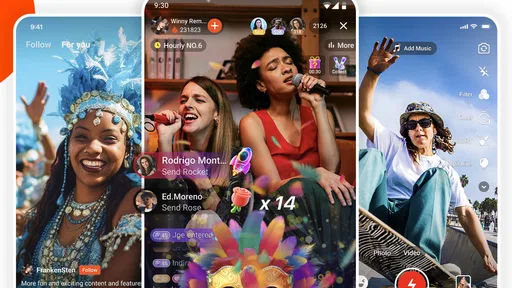
Downloading Kwai was a breeze. Available on both Android and iOS, the app is quick to install, and in no time, you're diving into a sea of vibrant and entertaining content. The interface is sleek and intuitive, making navigation a piece of cake even for first-time users. You have your main feed filled with trending videos, and a discover section that lets you explore new creators and trends. It's a bit like walking into a candy store—so much to see and taste!
Features That Keep You Hooked
One of the standout features of Kwai is its diverse range of content. From hilarious skits and dance challenges to cooking tutorials and beauty hacks, there's something for everyone. What's more, the app uses a smart algorithm to tailor content to your preferences the more you interact with it. So, the more you watch and like, the more personalized your feed becomes.
Creating videos on Kwai is incredibly user-friendly. The app offers a variety of editing tools, filters, and effects that allow creators to add that extra spark to their videos. Whether you're adding music, playing around with speed, or using fun stickers, the creative possibilities are endless. It’s almost like having a mini production studio in your pocket!
Social Interaction and Community
Kwai isn't just about watching videos; it's about building a community. The app encourages interaction with a robust commenting system and the ability to follow your favorite creators. You can even duet with other users' videos, adding your own spin to their content. It's a fantastic way to collaborate and engage with people from all over the world.
Plus, the app hosts various challenges and contests that not only boost your creativity but also give you a chance to win some exciting rewards. It's a fun way to keep users engaged and motivated to create more content.
Privacy and Security
In today’s digital age, privacy is a big concern for many users. Kwai takes this seriously and provides several privacy settings to control who can see and interact with your content. You can set your account to private, restrict comments, and even block users if needed. It's reassuring to know that you have control over your digital footprint.
Monetization and Rewards
If you’re looking to make a little extra on the side, Kwai has a monetization feature that rewards creators based on their content's popularity. This can be a great incentive for aspiring influencers and content creators to showcase their talent and earn some cash while doing what they love.
What to expect when a session is interrupted
In a mobile setting, a connection can change without warning: Wi-Fi may drop, reception may weaken, or you may need to close the app and return later. I would treat a failed or paused session as a cue to check the network before attempting a live stream or upload again. For a viewer, reopening the feed when the connection is stable is usually a simpler recovery than trying to follow a live moment through repeated interruptions.
Creators should be especially patient around publishing. If a clip matters, take a moment to confirm that the connection is steady before sharing, then check that the post appears as expected. This is a practical precaution, not a promise about how the app handles every interrupted upload. It also helps avoid repeatedly tapping controls when the app is still responding to a slow network.
Who may prefer another kind of app
Kwai is not the right fit for everyone. If you want to watch videos without a stream of social prompts, or you prefer long-form viewing over quick clips, a conventional video service may suit you better. Likewise, someone who wants a private editing workspace rather than a community feed may find a standalone editor less distracting. And if you rely on a connection that frequently cuts out, live content and continuous scrolling are likely to feel less satisfying here.
For younger users, the Teen age rating is a useful starting point for deciding whether the app fits the household, but I would still review privacy choices and talk about how public comments and creator interactions work. A private account, limits on comments, and blocking options can help shape the experience, yet they do not remove the need for sensible judgment when sharing personal material.
Kwai is a free app from Joyo Technology Pte Ltd in the video players and editors category. It has a 4.1 average from around 11 million ratings, with over 500 million installs, which suggests it has found a very large audience. The app is rated Teen, and in-app purchases range from $0.99 to $114.99 per item. Its current version is 13.1.10.543603, and it runs on Android 5.0 and later. Those details are useful context, but I would decide based on whether its mix of short videos, editing, and social activity matches my habits.
Concluding Thoughts
Overall, Kwai - Cool Video & Social Fun is a fantastic platform for anyone looking to dive into the world of short videos. It offers a unique blend of entertainment, creativity, and social interaction that keeps you coming back for more. Whether you're a viewer or a creator, Kwai provides a space to express yourself and connect with a vibrant community. So why not give it a try? You might just discover your new favorite app!
My practical verdict is that Kwai works best when I have a steady connection and a clear reason to open it: catch up with creators, explore a trend, edit a quick clip, or take part in a live community moment. It is less appealing as a dependable option for low-signal travel, careful professional editing, or tightly controlled viewing time. If those trade-offs suit you, it is an easy app to sample; if they do not, a simpler video viewer or dedicated editor may be the more comfortable choice.
How Kwai - Video & Drama Compares
Full ComparisonChoose YouTube for the broadest mix of videos, BiliBili for anime and licensed titles, or Kwai for short-form creation, effects, and social sharing.
| App | Developer | Rating | Price |
|---|---|---|---|
 YouTube | Google LLC | 3.8 | Free |
 BiliBili -HD Anime, Videos | BALABOOM PTE. LTD. | 3.7 | Free |
 Kwai - Video & DramaThis App | Joyo Technology Pte Ltd | 4.0 | Free |
Verdict
Strengths of Kwai - Video & Drama
- User-friendly interface for easy navigation.
- Wide variety of fun filters and effects.
- Engaging community with global reach.
- Offers monetization for content creators.
- Fast video upload and sharing options.
Limitations of Kwai - Video & Drama
- Contains in-app ads that can be intrusive.
- Limited editing features compared to rivals.
- Occasional app crashes reported by users.
- Privacy concerns due to data permissions.
- Requires strong internet for optimal use.
Similar Picks in This Category
View All
Google TV
Google LLC3.9

iTunes
Apple4.7

YouTube
Google LLC3.8

MX Player
Amazon Mobile LLC4.2

CapCut - Video Editor
Bytedance Pte. Ltd.3.5

PLAYit-All in One Video Player
PLAYIT TECHNOLOGY PTE. LTD.4.5
You May Also Like
View All


Frequently Asked Questions
What is Kwai - Cool Video & Social Fun?
Kwai is a popular social media app that allows users to create, share, and discover short videos. It offers a platform for users to express their creativity with various effects, filters, and editing tools. Beyond video creation, Kwai also emphasizes community interaction, allowing users to follow others, leave comments, and engage with trending content.
Is Kwai free to use?
Yes, Kwai is free to download and use. The app offers a wide range of features without any cost. However, there may be optional in-app purchases available, such as special effects or premium features, which can enhance the user experience. It's important to check these options if you wish to explore additional functionalities.
What are the main features of Kwai?
Kwai provides users with a variety of features, including video creation tools, filters, and editing effects. Users can explore trending videos, participate in challenges, and engage with a vibrant community. Additionally, Kwai supports direct messaging and interactions like comments and likes, creating a dynamic social experience.
Is Kwai safe for children to use?
While Kwai offers a fun and creative outlet, it's essential for parents to supervise their children’s use of the app. The platform includes user-generated content, which may not always be suitable for younger audiences. Parents should utilize any available parental controls and privacy settings to ensure a safe environment for their children.
How does Kwai compare to other video-sharing apps?
Kwai distinguishes itself with its robust community engagement and a focus on trending challenges and interactions. While it shares similarities with other apps like TikTok, Kwai’s unique effects and regional content make it a popular choice in certain markets. Users often appreciate its user-friendly interface and creative tools.
